
Ubiquiti UniFi Access Point In-Wall
In-Wall Wi-Fi Access Point
SKU: #UAP-AC-IW
Our Price: Request a Quote
Please Note: All prices displayed are Ex-VAT. 20% VAT is added during the checkout process.
Get a Quote
- Quantity
Overview
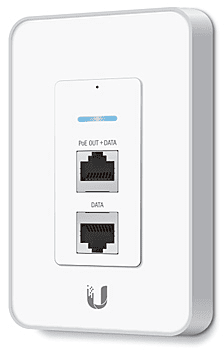
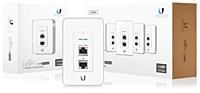
The UniFi In-Wall Wi-Fi AP is ideal for retrofitting an existing, in-wall, wired Ethernet jack to a wireless access point.
Scalable and Unified Enterprise WiFi Management
The UniFi Enterprise WiFi System is a scalable enterprise access point solution designed to be easily deployed and managed. UniFi Access Point indoor models have a sleek design and can be easily mounted to a ceiling tile or wall using the included mounting hardware. UniFi Access Point outdoor models have a form factor built to last outdoors.
The UniFi Enterprise WiFi System includes the UniFi Controller software. The software installs on any PC or Mac within the network and is easily accessible through any standard web browser. Using the UniFi Controller software, an Enterprise WiFi network can be instantly configured and administered without any special training. Real-time status, automatic UAP device detection, map loading, and advanced security options are all seamlessly integrated.
Example of Zero Handoff Roaming on a University Campus
With Ubiquiti's Zero Handoff Roaming, students keep their devices seamlessly connected as they move from the classroom through the plaza, to a cafe and then home to the dormitory.
Pricing Notes:
- Pricing and product availability subject to change without notice.
| Ubiquiti Products | ||
|---|---|---|
| UNIFI AP IN-WALL | #UAP-AC-IW-US | Get a Quote |
| 5PK UNIFI AP IN-WALL | #UAP-AC-IW-5-US | Get a Quote |
| In-Wall 802.11AC PRO Wi-Fi Access Point | #UAP-AC-IW-PRO | Get a Quote |
| In-Wall 802.11AC PRO Wi-Fi Access Point 5 pack | #UAP-AC-IW-PRO-5 | Get a Quote |
Features
Instant Deployment
Transform any existing Ethernet outlet into a versatile UniFi AP – no additional wiring needed.
Easy Installation
Upgrade any single-gang Ethernet outlet to the UniFi In-Wall Wi-Fi AP.
Power over Ethernet
The UniFi In-Wall Wi-Fi AP works with the UniFi Switch (24 and 48 port versions available).
Versatile Data and PoE Output
An integrated PoE passthrough port conveniently connects and powers a security camera, VoIP phone, or high-end AP.
Advanced Software Features
Save money and save time. Unlike traditional enterprise Wi-Fi systems that utilize a hardware controller, UniFi comes bundled with a non-dedicated software controller that can be deployed on an on-premise PC, Mac, or Linux machine; in a private cloud; or using a public cloud service.
Powerful Hardware
The UniFi Access Points feature Wi-Fi 802.11n MIMO technology for superior performance in the 2.4 and/or 5 GHz bands, with ranges up to 600 ft.
Intuitive UniFi Controller Software
Install, configure, and manage all of your UniFi APs with the intuitive and easy-to-learn UniFi Controller user interface.
Expandable
Unlimited scalability. Build wireless networks as big or small as needed. Start with one (or upgrade to a three-pack) and expand to thousands while maintaining a single unified management system.
Indoor Models
Easy Mounting – sleek wall or ceiling mount design (all accessories included).
Design
Aesthetic industrial design with a unique LED provisioning ring or square, which provides administrator location tracking and alerts for each device.
Power over Ethernet (PoE)
The UAP-IW can be powered by a UniFi Switch. It cannot be powered by a passive PoE source such as a PoE injector or the TOUGHSwitch. UniFi indoor models are available in single-packs and multi-packs.
Included Accessories
Except for the UAP-IW, all UniFi APs include a Wall and Ceiling Mount Kit and Power over Ethernet Adapter.
Deployment
Network Topology Requirements
- A DHCP-enabled network for the AP to obtain an IP address (wireless clients will also obtain IP addresses after deployment)
- A management station computer running the UniFi Controller software, located either onsite and connected to the same Layer 2 network, or off-site in a cloud or NOC
Sample Network Diagram
Example of how UniFi APs can be deployed to optimize coverage in indoor and outdoor environments.
Extend Your Coverage
With the UniFi Controller software running in a NOC or in the cloud, administrators can extend and centrally manage wide areas of coverage using any combination of UniFi AP devices.
Below are some examples of how UniFi APs can be deployed.
Multi-Site Management
A single UniFi Controller running in the cloud manages multiple sites. Each site is logically separated and has its own configuration, maps, statistics, guest portal, and administrator read/write and read-only accounts.
Extend Wirelessly
Take advantage of wireless downlinking. One wired UniFi AP uplink supports up to four wireless downlinks, allowing wireless adoption of devices in their default state and real-time changes to network topology.
Manage Hotspots and Control Billing
Use Hotspot Manager to customize portal login pages and bill customers using major credit cards via PayPal. Alternatively, use a voucher-based authentication system for voucher creation, user administration, guest management, and payment refunds.
Product Views
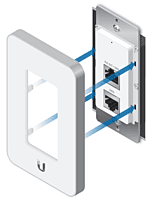
Cover Plate
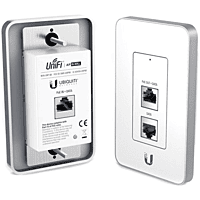
Wall Box to the port
UniFi AP In-Wall Specification
| Specification | Details |
|---|---|
| Dimensions | 114.6 x 70.6 x 28.5 mm (4.51 x 2.78 x 1.12 in) |
| Weight | 117 g (4.127 oz) |
| Networking Interface | (3) 10/100 Ethernet Ports |
| Buttons | Reset |
| Operating Band | 2.4 GHz |
| Antenna Gain | 1 dBi |
| Wi-Fi Standards | 802.11 b/g/n |
| Power Method | UniFi Switch |
| PoE Out | 48V Pass-Through (Pins 1, 2+; 3, 6-) |
| Maximum Power Consumption | 6 W |
| Max TX Power | 17 dBm |
| BSSID | Up to Four Per Radio |
| Power Save | Supported |
| Wireless Security | WEP, WPA-PSK, WPA-Enterprise (WPA/WPA2, TKIP/AES) |
| Certifications | CE, FCC, IC |
| Mounting | 1-Gang Electrical Wall Box (Not Included) |
| Operating Temperature | -10 to 70° C (14 to 158° F) |
| Operating Humidity | 5 to 95% Noncondensing |
Advanced Traffic Management
| Feature | Details |
|---|---|
| VLAN | 802.1Q |
| Advanced QoS | Per-User Rate Limiting |
| Guest Traffic Isolation | Supported |
| WMM | Voice, Video, Best Effort, and Background |
| Concurrent Clients | 100+ |
Supported Data Rates (Mbps)
| Standard | Data Rates |
|---|---|
| 802.11n | 6.5 Mbps to 300 Mbps (MCS0 - MCS15, HT 20/40) |
| 802.11b | 1, 2, 5.5, 11 Mbps |
| 802.11g | 6, 9, 12, 18, 24, 36, 48, 54 Mbps |
Package Contents
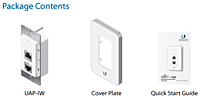
UniFi AP In-Wall Access Point with Mounting Accessories.
*Note: Multi-packs do not include PoE adapters; power the UniFi APs using a UniFi Switch.
UniFi Product Comparison
| UniFi | UniFi AP In-Wall | UniFi AP | UniFi AP-LR | UniFi AP-Pro | UniFi AP-Outdoor 5G | UniFi AP-Outdoor+ |
|---|---|---|---|---|---|---|
| Usage | Indoor | Indoor | Indoor | Indoor | Outdoor | Outdoor |
| 2.4 GHz Speed* | 150 Mbps | 300 Mbps | 300 Mbps | 450 Mbps | 450 Mbps | |
| 5 GHz Speed* | 300 Mbps | 300 Mbps | ||||
| Range* | 25 m (82 ft) | 122 m (400 ft) | 183 m (600 ft) | 122 m (400 ft) | 183 m (600 ft) | 183 m (600 ft) |
| Secondary Ethernet Port | Yes | Yes | ||||
| Gigabit Ethernet | Yes | Yes | Yes | Yes | ||
| Wi-Fi Standards | 802.11 b/g/n | 802.11 b/g/n | 802.11 b/g/n | 802.11 a/b/g/n | ||
| 2.4 GHz | Yes | Yes | yes | yes | 802.11 a/n | 802.11 b/g/n |
| 5 GHz | Yes | Yes | ||||
| Simultaneous Dual-Band | Yes | Yes | ||||
| Ubiquiti PoE | Yes | Yes | Yes | |||
| 802.3af Compliant | Yes | 802.3af (PoE) | Yes | Yes | ||
| Wall Mount | Yes | Yes | Yes | Yes | 802.3af (PoE) | |
| Ceiling Mount | Yes | Yes | Yes | Yes | Yes | |
| Pole Mount | ||||||
| Security Lock | Yes | Yes | Yes | Yes | Yes | Yes |
| External Antennas | Yes | Yes |
* Speed and Range values may vary and are based on optimal environments.
Technology
Zero Handoff Roaming
Multiple access points act as a cluster, appearing as a single AP and enabling seamless roaming by wireless clients.
Any-Sized Network Appears as One AP
A wireless client detects only one AP, so it seamlessly maintains its connection as it switches to the nearest AP. There is no need for the client to renegotiate; any negotiation is offloaded to the APs. They decide which AP should take over the live connection next when the client moves.
Ideal for Mobile Clients
Zero Handoff Roaming is ideal for mobile clients that tend to move around or sticky clients that tend to stay connected to the same access point.
Zero Handoff Roaming Process
| Client connected to AP A | APs A and B negotiate to determine which AP best sees the client | AP B takes over the client connection | APs B and C negotiate to determine which AP best sees the client | AP C takes over the client connection |
Multi-Lane RF Technology
The UniFi APs use multicasting to communicate with each other and determine which is the best AP for the client based on signal, thereby preventing any packet loss or latency. Only the AP with the best signal serves the client.
High-Selectivity Receiver
Multi-Lane RF Technology isolates signals on the operating channel and rejects interference using specialized circuitry: the High-Selectivity Receiver.
Increases Capacity and Throughput in High-Density Areas, Optimizes Operating Channel
Although theoretically channels 1, 6, and 11 of the 2.4 GHz operating band shouldn't overlap, in practice there is cross-channel interference that affects receiver performance, especially in noisy, high-density environments. For example, a typical AP operating on channel 6 also hears RF from channels 1 and 11, because the typical AP has a generic filter that only filters out any non-2.4 GHz interference – all 2.4 GHz frequencies are still allowed in.
When the UniFi AP-Outdoor+ operates on the selected channel, its Multi-Lane RF technology specifically eliminates the other channel frequencies, creating a clean spectrum with minimal noise.
More Capacity – More Performance
Multi-Lane RF technology adds 30+ dB of adjacent channel rejection through the active filter design, so the UniFi AP Outdoor+ can achieve up to double or triple the performance of a typical AP in a high-density environment.
2.4 GHz Spectrum
2.4 GHz Spectrum with Multi-Lane RF
Software
UniFi Controller Software
After the UniFi Controller software is installed on a Mac or PC, the UniFi Controller can be accessed through any device using a web browser. The UniFi Controller allows the administrator to instantly provision thousands of UniFi APs, map out networks, quickly manage system traffic, and further provision individual UniFi AP devices.
Packed with Features
Use the UniFi Controller to provision thousands of UniFi APs, map out networks, quickly manage system traffic, and provision additional UniFi APs.
Manage Your Networks from a Single Control Plane
The UniFi Controller can be accessed through any device using a web browser. A single UniFi Controller running in the cloud can manage multiple sites: multiple, distributed deployments and multi-tenancy for managed service providers.
Intuitive and Robust Configuration, Control and Monitoring
The UniFi Controller enables the administrator to instantly provision and configure thousands of UniFi APs, allowing for quick, simple management of system traffic.
Breakthrough RF Map
Use the RF map to monitor and analyze radio frequencies for optimal AP placement, configuration, and troubleshooting.
Powerful RF Performance Features
- Spectral analysis
- Airtime fairness
- Band steering
Detailed Analytics
Use configurable reporting and analytics to manage large user populations and expedite troubleshooting.
Wireless Uplink
Wireless Uplink functionality enables wireless connectivity between APs for extended range. One wired UniFi AP uplink supports up to four wireless downlinks on a single operating band, allowing wireless adoption of devices in their default state and real-time changes to network topology.
Guest Portal / Hotspot Support
Easy customization and advanced options for Guest Portals include authentication, Hotspot setup options, and the ability to run as an external portal server. Take advantage of UniFi’s rate limiting for your Guest Portal and Hotspot package offerings. Apply different bandwidth rates (download/upload), limit total data usage, and limit duration of use.
All UniFi APs include Hotspot functionality:
- Built-in support for billing integration using major credit cards
- Built-in support for voucher-based authentication
- Built-in Hotspot Manager for voucher creation, guest management, and payment refund
- Full customization and branding of Hotspot portal pages
Multi-Site Management
A single UniFi Controller running in the cloud can manage multiple sites: multiple, distributed deployments and multi-tenancy for managed service providers. Each site is logically separated and has its own configuration, maps, statistics, guest portal, and administrator read/write and read-only accounts.
WLAN Groups
The UniFi Controller can manage flexible configurations of large deployments. Create multiple WLAN groups and assign them to an AP's radio.
Remote Firmware Upgrade
Save time and effort by remotely upgrading device firmware.
Users and Guests
Keep track and control access of specific users and guests connected to your network(s).
One UniFied Network with Zero-Handoff Roaming
Create one large wireless network across multiple APs so users can roam and seamlessly maintain their connection as they switch to the nearest AP.
Custom Maps and Google Maps
Upload custom maps or use Google Maps for a visual representation of your wireless network.
Dashboard
UniFi provides a visual representation of your network's status and delivers basic information about each network segment.
RF Map
Monitor UniFi APs and analyze the surrounding RF environment.
Statistics
UniFi organizes and visualizes network traffic in clear and easy-to-read graphs.
Map
Use custom or Google Maps integration for visualizing device locations and wireless network layout.
Miscellaneous
TOUGHCable
Protect your networks from the most brutal environments with Ubiquiti's industrial-grade shielded ethernet cable, TOUGHCable.
- Increase Performance: Dramatically improve your ethernet link states, speeds, and overall performance with Ubiquiti TOUGHCables.
- Extreme Weatherproof: Built to perform even in the harshest weather and environments.
- ESD Damage Protection: Protect your networks from devastating electrostatic discharge (ESD) attacks.
- Extended Cable Support: Developed with increased power handling performance for extended cable run lengths.
Bulletproof your networks
TOUGHCable is currently available in two versions: PRO Shielding Protection and CARRIER Shielding Protection.
TOUGHCable PRO
is a Category 5e, outdoor, carrier-class shielded cable with an integrated ESD drain wire.
TOUGHCable CARRIER
is a Category 6, outdoor, carrier-class shielded cable that features an integrated ESD drain wire, anti-crosstalk divider, and secondary shielding. It is rated to provide optimal performance on Gigabit Ethernet networks.
Additional Information
- 24 AWG copper conductor pairs
- 26 AWG integrated ESD drain wire to prevent ESD attacks and damage
- PE outdoor-rated, weatherproof jacket
- Multi-layered shielding
- Available in lengths of 1000 ft (304.8 m)
TOUGHCable Connectors
Specifically designed for use with Ubiquiti TOUGHCables and available in 100-pc. bags, TOUGHCable Connectors protect against ESD attacks and Ethernet hardware damage while allowing rapid fi eld deployment without soldering.
ESD attacks are the leading cause for device failures. The diagram below illustrates the areas vulnerable to ESD attacks in a network.
By using a grounded Ubiquiti Power over Ethernet (PoE) Adapter along with Ubiquiti TOUGHCable and TOUGHCable Connectors, you can effectively protect against ESD attacks.
* Four- and five-packs do not ship with PoE adapters; powering via UniFi Switch is recommended.